Blog · September 25, 2026 · 7 min read
Claude Code Notch Notifications on Mac: See When Claude Is Done Without Watching the Terminal
Claude Code has an awkward habit: it finishes silently. You send a prompt, it works for a few minutes, and then it either completes the task or stops to ask permission for a tool — without making a sound. If you're watching the terminal, you lose those minutes. If you're not, you lose even more, because the session sits there waiting for you.
On a modern MacBook there's a spot on screen you glance at constantly without thinking about it: the notch. This guide covers the ways to get Claude Code notifications on a Mac, and why putting them in the notch is the least distracting option.
The two moments you need to know about
A good Claude Code notification setup tells you about two different events, because they call for different reactions:
- Done. Claude finished its turn. You can review the result whenever you're ready — right now, or after you finish what you're doing.
- Needs permission or input. Claude is blocked, waiting for you to approve a shell command or tool call, or to answer a question. Every minute you don't notice is a minute of wasted agent time.
A third state is worth seeing too, though it doesn't need an alert: working. Knowing that Claude is still busy (and on what) is what lets you confidently look away.
Option 1: DIY with Claude Code hooks
Claude Code has a hooks system that runs shell commands on events. The Stop event fires when Claude finishes responding, and the Notification event fires when it needs your attention. Wire both to macOS's built-in osascript in ~/.claude/settings.json:
{
  "hooks": {
    "Stop": [
      {
        "hooks": [
          {
            "type": "command",
            "command": "osascript -e 'display notification \"Claude is done\" with title \"Claude Code\"'"
          }
        ]
      }
    ],
    "Notification": [
      {
        "hooks": [
          {
            "type": "command",
            "command": "osascript -e 'display notification \"Claude needs you\" with title \"Claude Code\"'"
          }
        ]
      }
    ]
  }
}
Restart your Claude Code session and you'll get a standard macOS banner for both events. It's free and takes five minutes, but it has limits: the banners appear to come from Script Editor, they pile up in Notification Center, they don't tell you what Claude was working on, and a JSON typo silently breaks them. Our Claude Code notifications guide covers this setup in more detail, including sounds.
Option 2: menu bar notifications
If you want polished banners without editing config files, AI Done Now is our menu bar app for exactly this. It sends native sound and banner notifications when Claude Code, Cursor, Codex or Gemini CLI finishes or needs input, with different alerts for "done" and "waiting for you", and clicking a notification jumps back to the right window. It's the right choice if you run several different AI tools and want a classic notification.
Option 3: notifications in the notch
Banners work, but they're interruptions by design: they slide over whatever you're doing and then disappear into Notification Center. The notch is different. It's always there, it's at the top center of your screen where your eyes already pass, and it's otherwise dead space.
Claude Code notch notifications use that space as a live status panel for your AI agent. Instead of a one-off banner, the notch expands to show what Claude is doing right now, then changes state when it's done or needs you.
How NotchFit shows Claude Code status
NotchFit is the notch app we built for Claude Code and OpenAI Codex CLI. While your AI works, the notch expands into a panel. The right side is a live feed of your agent:
- Working on: your prompt, so you know which task is running.
- Done: with Claude's summary of what it did.
- Needs permission: with the tool Claude wants to use, so you know whether it's worth jumping back immediately.
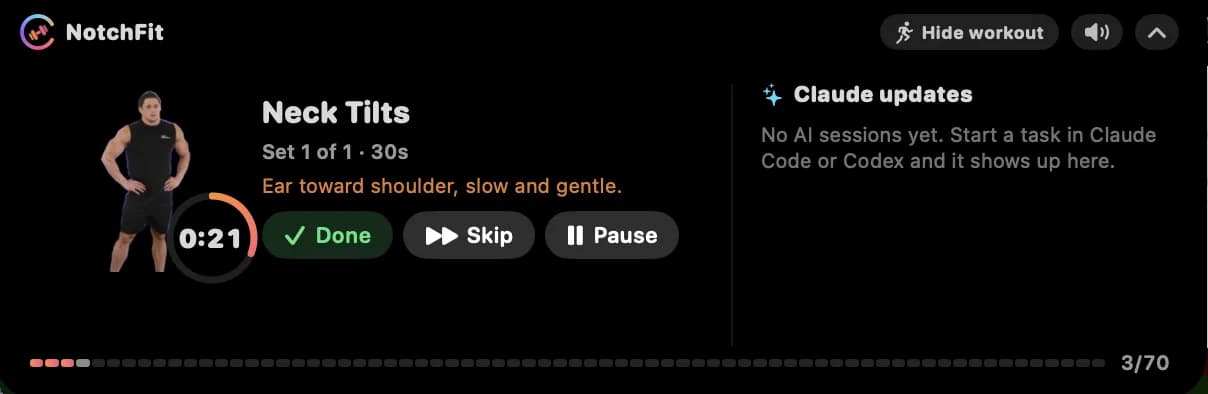
The left side is the twist: a short guided workout — an animated exercise with a rep or time countdown and Done, Skip and Pause buttons — so the minutes Claude spends working become minutes you spend moving. If you only want the status panel, the Hide workout toggle hides the exercise and the notch just follows your AI (the workout pauses).
A few details that matter for day-to-day use:
- Mid-set alerts wait. If Claude finishes while you're in the middle of a set, the notification waits until the set ends.
- Optional spoken alerts. On-device macOS voices can announce alerts, with a mute button right in the notch. No microphone is ever used.
- No slowdown. The Claude Code plugin's hooks run asynchronously, so Claude never waits on NotchFit.
- Local only. Everything talks over localhost on your Mac. No account, no telemetry.
Setting up Claude Code notch notifications
- Install NotchFit. It's a signed and notarized DMG for macOS 14 or later, on Apple Silicon or Intel.
- Open Setup and click Install / update integrations. This installs the NotchFit Claude Code plugin (activity hooks plus the
/notchfit:plancommand) and the Codex skills and hooks. For Codex, trust the hooks once via/hooks. - Try it. Setup has buttons to simulate "AI working", "AI done" and "permission" so you can see each state before your next real task.
- Start a Claude Code session and send a prompt. The notch opens while Claude works.
What if my Mac doesn't have a notch?
NotchFit still works. On Macs without a notch it shows a small pill at the top center of the screen that expands the same way. The notch is simply where it looks best.
Which option should you use?
- Hooks + osascript if you want something free and don't mind maintaining JSON.
- AI Done Now if you want classic banners and sounds across Claude Code, Cursor, Codex and Gemini CLI.
- NotchFit if you use Claude Code or Codex on a Mac, want live status instead of one-off banners, and like the idea of moving while your AI works.
Whichever you pick, the goal is the same: stop watching the terminal. Let the notification tell you when Claude is done, and spend the wait on something better — a few desk exercises, for example.
Keep reading
Desk Exercises for Programmers: 15 Moves to Do While Your AI Agent Codes
7 min read
Exercise While Coding: Turn Claude Code Wait Time Into Micro-Workouts
7 min read
Claude Code Tips and Tricks: 12 Ways to Use Claude Code Effectively
8 min read
Claude Code Multiple Sessions: How to Run Agents in Parallel Without Losing Track
6 min read
A Claude Code Workflow That Doesn't Involve Watching the Terminal
5 min read
Claude Code Hooks: A Practical Guide to Automating Your Agent Workflow
7 min read
Claude Code Auto Mode: Fewer Permission Prompts Without Living Dangerously
7 min read
Claude Code Subagents: How to Delegate Work to Specialized Agents
7 min read
Claude Code Context Management: Treat the Context Window Like a Budget
6 min read
Per-Subagent Model Selection: Route the Grunt Work Down, Keep the Judgment Up Top
7 min read
Skills and Plugins: How to Teach Claude Code Your Way of Working
7 min read
Claude Code Background Tasks: Run Long Commands Without Blocking Your Session
6 min read
Codex CLI Notifications: How to Get a Ding When Codex Is Done or Needs Input
7 min read
Cursor Notification When Done: Every Way to Get Notified When Cursor Finishes
6 min read
Claude Code Notifications: How to Get Notified When Claude Code Finishes or Needs Your Input
6 min read
Want to Be Notified When Claude Responds? How Claude Notifications Work on Web, Desktop, and Mobile
5 min read
Claude Code Notification Scripts: Copy-Paste Recipes for Every Platform
6 min read
Get a Ding the Moment Codex Needs Your Response
6 min read
Get Notified the Moment Claude Code Is Waiting for Your Input
6 min read
“Notifications Are Turned Off for Claude” — Here Is the Fix
6 min read
Codex Sound When Done: Make Codex CLI Play a Sound When It Finishes
6 min read
terminal-notifier + Claude Code: Native macOS Alerts When Your Agent Finishes
6 min read
Gemini CLI Notifications: How to Get a Sound or Alert When Gemini Finishes
6 min read
Get Claude Code Notifications on Your Phone
6 min read
Claude Code Remote Control, Explained
7 min read
preferredNotifChannel: Claude Code's Built-In Notification Setting
6 min read
Claude Code Notifications in tmux and Over SSH
7 min read
Claude Code Effort Levels: Why Your Setting Keeps Getting Ignored
8 min read
Codex vs Claude Code Notifications: How Each One Tells You It Is Done
8 min read
Claude Code Notifications Not Working: A Diagnostic Checklist
8 min read
Claude Code Notifications Inside Your Editor's Terminal
7 min read
CLAUDE_CODE_DISABLE_BACKGROUND_TASKS Explained
7 min read
CLAUDE_CODE_DISABLE_BG_SHELL_PRESSURE_REAP Explained
8 min read
Cursor Alerts Explained: Every Alert Cursor Raises, and How to Control Them
7 min read
Claude Code Environment Variables: The Groups That Actually Matter
10 min read
Claude Code Notifications on WSL and Windows
9 min read